
My role
UX Research
UI Design
Design system
Tools
Figma
FigJam
Complex System
2022
The Challenge
I was approached by Castro in my capacity as a former Castro fashion designer and a current product designer to redesign part of their collection management system as currently used by their fashion designers. This is a complex, diffused and slow system over 10 years old, which was subjected to update attempts in the past two years based on no characterization but rather on add-on features which have made it even heavier and more diffused than before.
In response to recurring bugs and the inflow of new and younger studio designers, the Company opted for a root change of the current system.
Overview
The Collection Book is a Castro fashion designers tool serving to dispatch new model designs to Production as well as follow up on current models and run sale analyses.


Existing System
Castro had provided two systems – one to upload models and run follow-ups, and the other to look up locally available models and review model specifications or sale statuses.
I combined the two systems into one designers system and fused the various functions and screens so as to clear out the display. A case in point was that of the distinct sale and stock screens which I united.
Target Users
Product’s target users are design studio designers alone (trade and control teams use other systems), mostly aged 27 to 37.
The requirement was for a lightweight, intuitive system for intensive, daily use.
Hierarchy Map

Colors

Typography


User Flow


The Process
I started out by assessing how new designers are using the current systems and where they “lost the thread” back in training.
I then watched how the more experienced designers were using the system and listed the tools which the system needed.
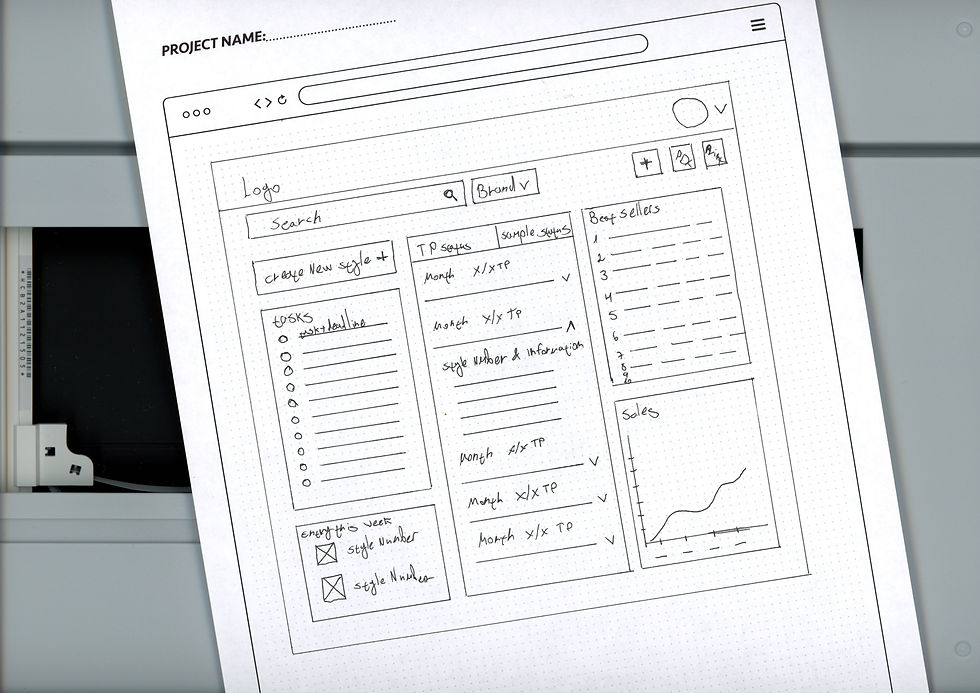
I mapped those which research had shown irrelevant for the design team and arranged them down the relevant hierarchy.


The Design Justification
The design is clean and uncongested, to avoid the older system’s sense of suffocation.
The elements are all up to date however with a timeless design, to remain useful for many years to come.

Designer Stage
On system login, the Designer Stage screen opens to display for the individual designer own missions and goals and allow model and sale status follow-ups.
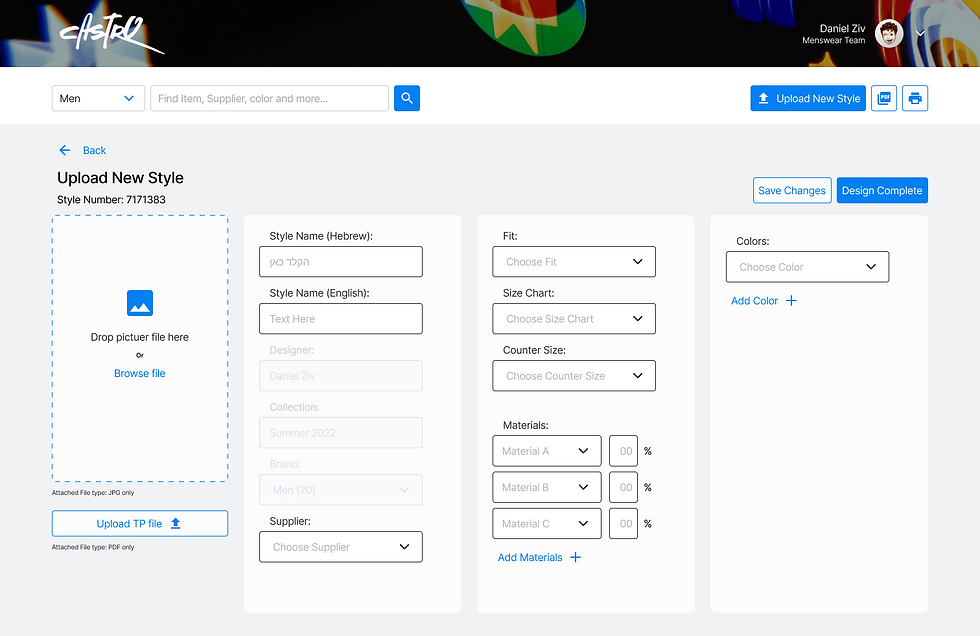
This screen offers two major CTA – Upload new Style and current model search.


Upload New Style
On clicking "Upload New Style" BTN, another screen opens where the designer can fill in the details and upload the product file (Tech Pack) and image. This process can be allowed to run to completion or else frozen.
Style Info
The Search option displays model data, specifications and processing stage. For models available in the store, sale and stock statuses can also be displayed.

* Click to stop
* Tap to stop
Design System


